PlanogramBuilder Light - User Guide

Version 50 - January 2026
What is new in version 50
Attention: all users must update PlanogramBuilder before February 28, 2026.
Please consult Mandatory updates for instructions.
News about Visualization
- Terminology: the terms Navigation and Camera now use only Camera in the GUI. This applies to all tools, commands and parameters related to manipulating the viewpoint.
- A new task named Visualization has been added with two panels:
-
- View: options and user presets related to planogram display and style. Several existing parameters have been moved here from Settings for convenience.
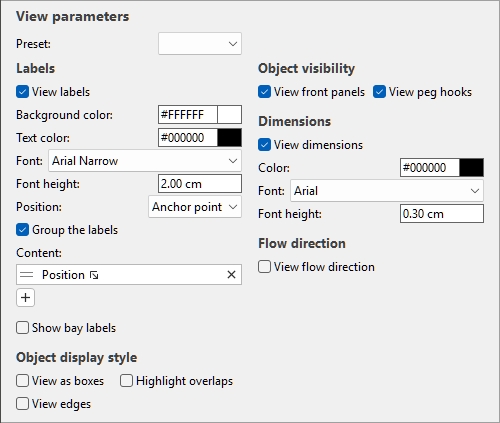
- Camera: parameters of the current camera viewpoint and management of saved viewpoints. This panel was previously displayed independently of any task. Schematic View no longer exists as a single toggle. It has been split into two individual toggles for more flexibility and practicality. Turn both ON to obtain boxes with text labels.
-
- View as boxes: shows all the products and accessories in your project as simple boxes with no product image.
- View labels: displays customizable text labels on products and accessories.
- Text on product labels can now display many more product properties and metrics. Consult Columns for the list of available choices.
- Product labels can be assigned a new position: Anchor point, which uses Bottom position for products on shelves, and Top position for products on pegs (the anchor point of each product). This results in labels being nicely aligned on all rows. Consult Position (Labels).
- For labels placed at Top, their upper edge is now placed below the hook for pegged products. This avoids the hooks impeding label readability.
News about editing
- Text of item tooltips can use any available item property or calculated value, as listed in Columns.
- Moving or copying Selected bay components from one bay to another one attaches the components to the destination furniture. Consult Move (Edit bay components) and Copy (Edit bay components).
- You can change the type of component using Replace Bay components in an existing bay.
News about Project item list
- New metrics can be selected to display in the list:
-
- Facings front: the quantity of each product seen from the front.
- Selecting the contents to display in the list is now done from a new selection dialog. Consult Content choice (Project item list).
- Double-clicking on a product or accessory in the list sets Item Info as the current task. Consult Mouse & keyboard shortcuts.
News about Report pictures
- The number of images can be defined freely both for Project pictures and Bay pictures. Consult Managing report pictures.
- For each image, various view toggles can be configured. Consult Properties (Report pictures).
News about Database
- The maximum number of custom properties for items in the database has been increased to 20. Consult Item custom properties (Settings).
- Selecting the contents to display in the database list is now done from a new selection dialog. Consult Choose columns (Database item list).
- The EXIF orientation tag of uploaded images is now properly applied.
Other News
- When a major update of PlanogramBuilder is required, you can now postpone installation until a fixed deadline. This lets you use the previous version until your IT installs the updated version.
- The Tutorial button (consult Screen Layout) now links directly to video tutorials in the language set in settings.
